





Order Meeting Catering in Outlook — In The Same Booking as the Room
Outlook books rooms, not catering. Out of the box, a catering request can only live in the invitation text, a colour category or an equipment mailbox — none of which tells a kitchen or caterer what to deliver, how much, or by when. An Outlook add-in such as arbooMEET attaches catering, services and seating to the meeting itself and notifies the teams who deliver them.
This page is for facilities and office managers, and for the IT teams evaluating a solution with them. It shows how far Outlook gets you on its own, where catering really breaks down day to day, how ordering works in the add-in — and when you don’t need software for it at all.
Can Outlook book catering and services on its own?
Only up to a point. Outlook and Exchange know room and equipment mailboxes, but not orders: no quantities, no menu, no lead time and no team that receives catering as a job. Five workarounds still get you part of the way, provided someone is willing to put effort into setting them up.
Five workarounds with what Microsoft 365 gives you
Equipment as a resource mailbox. Helps with: booking flipchart kits or AV kit alongside the room, provided IT has set them up in Exchange. Users then pick the equipment when they book the room. Falls short on: a resource mailbox knows availability, not quantities or variants. “Coffee and sandwiches for twelve, two of them vegetarian” doesn’t fit. Setting it up needs admin rights.
Colour categories and tags. Helps with: flagging meetings that need extra preparation. Falls short on: a category is a marker for your own overview, not an instruction to anyone else.
Notes in the invitation. Helps with: keeping a checklist or instructions in the meeting itself. Falls short on: it stays free text. Nobody confirms it, and a change only gets noticed if someone rereads it.
Outlook tasks for follow-up. Helps with: one task per meeting for preparation and coordination, linked to the appointment. Falls short on: the task reminds the organiser, not the team that delivers.
Recurring templates. Helps with: meetings that always need the same set-up don’t have to be described from scratch every time. Falls short on: the template saves typing. The request to the kitchen, caterer or building services is still manual.
What all five have in common: the information stays with the organiser or in the invitation text. Whoever delivers gets no order, no list and no notice of changes. For a small office with occasional refreshments, that is enough. For the wider picture, see where room booking with Microsoft 365 alone runs out.
Can you order catering through Microsoft Places?
Not natively. Microsoft Places has a “Services” feature, and Microsoft’s documentation describes services as web links and Teams apps. Its own example is a link to a cafeteria’s ordering website. Places links to catering; it does not book it. Places documents no feature of its own for order quantities, lead times or cost allocation.
Solutions marketed as “catering in Places” therefore add their own ordering form or app on top. The order then lives outside Places, and usually outside the Outlook meeting as well — with the same handover problems described in the next section.
Source: Microsoft Learn, Add services to buildings in Microsoft Places, documentation dated 5 August 2026.
Where does catering go wrong — in the order or in the handover?
In the handover. The person organising the meeting orders; someone else delivers — the kitchen or an external caterer, building services, facilities. In many organisations, email and phone calls are all that connects them. From a facilities perspective, this leads to three recurring problems: poor coordination between departments, no shared view of rooms and options, and last-minute changes.
1. Coordination between departments. Requests for catering, AV or a different seating layout reach facilities by email or phone, often at short notice. How organisers and facilities work together is frequently not agreed. Information gets lost or arrives too late, and the team can only react.
2. No shared view of room capacity and options. Not every room suits every layout, and not every service makes sense in every room. Some rooms can be rearranged, others are limited in space or equipment. That knowledge is rarely held in one place — the person ordering doesn’t have it, and facilities find out too late what was ordered.
3. Last-minute changes. The meeting moves, the headcount grows, the room changes. Every change to the meeting affects catering, AV and seating too. When a meeting is moved using native Outlook, any extra services have to be rebooked or cancelled separately — and someone forgets.
Another order form doesn’t fix any of this; it just adds one more place where information drifts apart. What fixes it is attaching the order to the meeting: the meeting already holds the room, the time, the attendees and the organiser, and any change to it reaches the order too.
How does ordering catering work in the Outlook add-in?
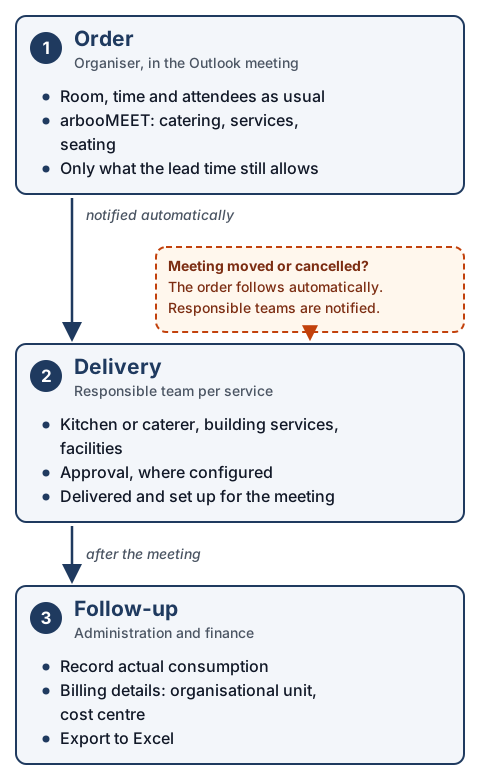
In arbooMEET, the Outlook meeting stays at the centre. The organiser sets up room, time and attendees as usual, opens the add-in and adds catering, services and seating from its menu. The responsible teams are notified automatically, depending on approval status. It works in Outlook on the desktop and in Outlook on the web.
Step by step
- Open Outlook, go to your calendar and choose the date and time.
- Enter the meeting details: subject, location, attendees, duration and, if needed, recurrence and reminder.
- Open arbooMEET from the meeting.
- Catering: choose food and drinks from the range set up for that room. Only items still within their lead time can be ordered. Save your selection.
- Services: for example a facilitation kit, extra pinboards or help from building services. Save your selection.
- Seating: every room has a default layout. Pick a different one if you need it; facilities are notified and have time to set it up. For help choosing, see which seating layout suits which meeting format.
- Save or send the meeting.

What facilities or IT set up once
So that organisers don’t need to know more than they do today, the logic lives in the configuration:
- Products per room. Which food, drinks and services can be ordered is defined room by room. The availability of services can be controlled independently for each room.
- Lead times. You decide how far in advance an order must be placed — for example 48 hours. The value is configurable, not fixed.
- Responsible teams. Every service is assigned an owner, and the owner is notified automatically.
- Approval. Where an order needs sign-off, an approval step keeps everyone involved informed.
- Sites. Each location can manage its own bookable resources.
What happens when the meeting changes?
If the Outlook meeting is rescheduled or cancelled, the order in arbooMEET follows automatically and the responsible teams are notified. That is the difference from native Outlook, where every extra service has to be changed or cancelled separately when a meeting moves.
What about visitors?
Client meetings add another dependency: someone has to receive the guests, and the host wants to know when they have arrived. Guests can be registered in Outlook while the meeting is being planned, and the host is notified on arrival. If you also need printed visitor badges and a digital check-in at reception, that is visitor management with arbooGREET. The two products work separately or together, which puts room, catering, seating and guests in one Outlook meeting rather than across three systems.
What happens after the meeting?
After the meeting comes the part most vendor pages leave out: does what was delivered match what was ordered, which cost centre is charged, and what goes to finance? arbooMEET records billing details such as organisational unit and cost centre with the booking, records actual consumption and keeps orders in a processing list. Orders can be exported to Excel.
If catering was ordered for twelve people and six turned up, the order is not the right basis for recharging — actual consumption is. How internal recharging and hospitality receipts fit together is a separate topic and deliberately not covered here.
Who does what differently?
Very little changes for the person booking: they keep working in Outlook, just with more options in the same meeting. The biggest change is for the teams who deliver, who receive orders instead of emails. Finance and IT each have one clearly defined job: one gets usable data, the other deploys an add-in.
- Organisers and PAs. No extra portal, no extra login, no ordering email. Room, catering, services and seating are booked in the meeting they are creating anyway. The add-in shows what can be ordered for the room, so nobody has to remember menus or lead times.
- Facilities and office management. Each request arrives as an order with room, time and service attached, not as a message in an inbox. Seating changes arrive as early as the lead time requires. Each site can manage its own bookable resources, move reservations and block rooms.
- Kitchen or caterer. They see what is needed, when and where, and are notified when the meeting moves or is cancelled. The details sit in the order, not scattered across emails.
- Finance and controlling. Organisational unit, cost centre and attendee details come with the booking. Actual consumption is recorded alongside what was ordered — the basis for recharging that adds up. Orders export to Excel.
- IT. arbooMEET is an Outlook add-in that works through the Microsoft Graph API with delegated calendar access. Hosting is in Germany or the EU, or in your own environment, with automatic deletion. A data processing agreement template is available.
How do you recognise a good solution for catering and services?
By three things: the order can capture everything a caterer needs to know; every service has a responsible team and a lead time; and the order follows the meeting when it changes. Use the checklists below to assess any vendor, including us.
Checklist 1: what a catering order must capture
- Type of meeting — Does the menu distinguish between a client meeting and an internal workshop?
- Headcount — Is it taken from the meeting, or typed in a second time?
- Dietary requirements — Is there a proper field for them, or does “two vegetarian” end up in free text?
- Menu choice — Can the range be restricted per room or site?
- Presentation — Buffet, table service or collection: is that part of the order?
- Timing — Can the delivery time be set separately from the meeting start? Is the lead time enforced or only recommended?
- Budget — Does the person ordering see prices before they order?
- Flexibility — What happens if the meeting is moved, cancelled or topped up on the day, including once the lead time has started?
- Service included — Can set-up, clearing away and crockery be ordered as services?
Checklist 2: clarify the five service categories before rollout
For each category, answer three questions: Who delivers? With what lead time? In which rooms is it available?
- Technical support — for example AV or help with video conferencing
- Room equipment — seating, tables, rearrangements
- Catering — food and drinks, in-house or through a caterer
- Support staff — reception, service, building services
- Additional equipment — facilitation kits, pinboards, flipcharts
Where a category has no owner, no software will help. Settling that is the bigger part of any rollout.
Questions to ask every vendor
- Is the order part of the Outlook meeting, or does it sit in a separate portal with its own login?
- Does the order follow the meeting automatically when it is rescheduled or cancelled?
- Is actual consumption recorded, or only what was ordered?
- Are cost centre and organisational unit captured with the order?
- Can a PA order catering for someone else’s meetings, for example through a delegated calendar?
- How are recurring meetings handled? Is catering ordered per occurrence, and what happens if a single occurrence moves?
- Where is order data stored, and is there a data processing agreement?
- Should your caterer maintain their own menu? If so, ask about it explicitly, including when you talk to us.
When don’t you need arbooMEET?
When catering is rare, informal and never recharged, the Outlook workarounds above are enough. An office with four rooms and no catering does not need arbooMEET. Neither does a caterer looking for software to run their own business, or a staff canteen that needs daily lunch sign-ups.
In detail:
- Few rooms, occasional catering, no internal recharging. The five workarounds above are enough.
- No Microsoft 365. arbooMEET works inside Outlook. Without Microsoft 365 and Outlook, there is nothing for it to run in.
- You are the caterer. Quotes, invoices to external customers and production planning are jobs for catering software, not room booking.
- A staff canteen with daily lunch sign-ups. That is a different job from catering for meetings.
- Your IT does not permit add-ins. Settle that first; see what rolling out an Outlook add-in means for IT.
Frequently asked questions
Can I order catering in Outlook without an add-in?
Not as a real order. Outlook can book rooms and equipment as resource mailboxes and hold requests as notes, categories or tasks. None of these produces an order with quantities, a lead time and a responsible team that updates when the meeting changes.
Does Microsoft Places support catering orders?
No. According to Microsoft’s documentation, Places “Services” are web links and Teams apps; Microsoft’s own example is a link to a cafeteria’s ordering site. Places links to catering; it does not book it.
What happens to the catering if the meeting is rescheduled or cancelled?
With arbooMEET, the order follows the Outlook meeting automatically and the responsible teams are notified. With native Outlook, extra services have to be changed or cancelled separately.
Who receives the order?
The team assigned to that service — for example the kitchen, a caterer, building services or facilities. The assignment is set up once; notifications are sent automatically.
Does it work in Outlook on the web?
Yes. arbooMEET runs in Outlook on the desktop and in Outlook on the web.
Can I book seating in the same meeting?
Yes, in the same meeting via the Seating option. Each room has a default layout; if you choose a different one, facilities are notified.
Where is booking and order data stored?
arbooMEET is hosted in Germany or the EU, or can run in your own environment, with automatic deletion. A data processing agreement template and documentation of sub-processors are available.
Room, catering and seating in one Outlook meeting. Find out more about the arbooMEET Outlook add-in, or see the process with your own rooms in a live demo.
Related Content


Meeting Room Booking as It Should Be, Straight from Microsoft Outlook

Join hundreds of satisfied clients across various industries who trust arboo to handle their office needs,
so they can focus on what truly matters. Will you be next?
